
How to Search Maricopa County Court Records
The main case search tool is the Superior Court docket portal. It splits into four free public indexes for Civil, Criminal, Family, and Probate cases. Each one feeds into a case-history page that lists the judge, the file date, the parties, and a docket of every filing. The civil portal landing page is shown below.
Before you start, gather what you can: a full last name and first name, a date of birth for a criminal search, or the case number if you already have it. Superior Court case numbers begin with a code such as CV for civil, CR for criminal, FC or FN for family, and PB for probate. The civil docket warns that some entries may shift for up to 24 hours due to audit, and the site is offline Tuesday through Saturday from 3:00 AM to 4:00 AM.
The Maricopa County Superior Court civil docket index opens the case search and lists tabs for Civil, Criminal, Family, and Probate cases.
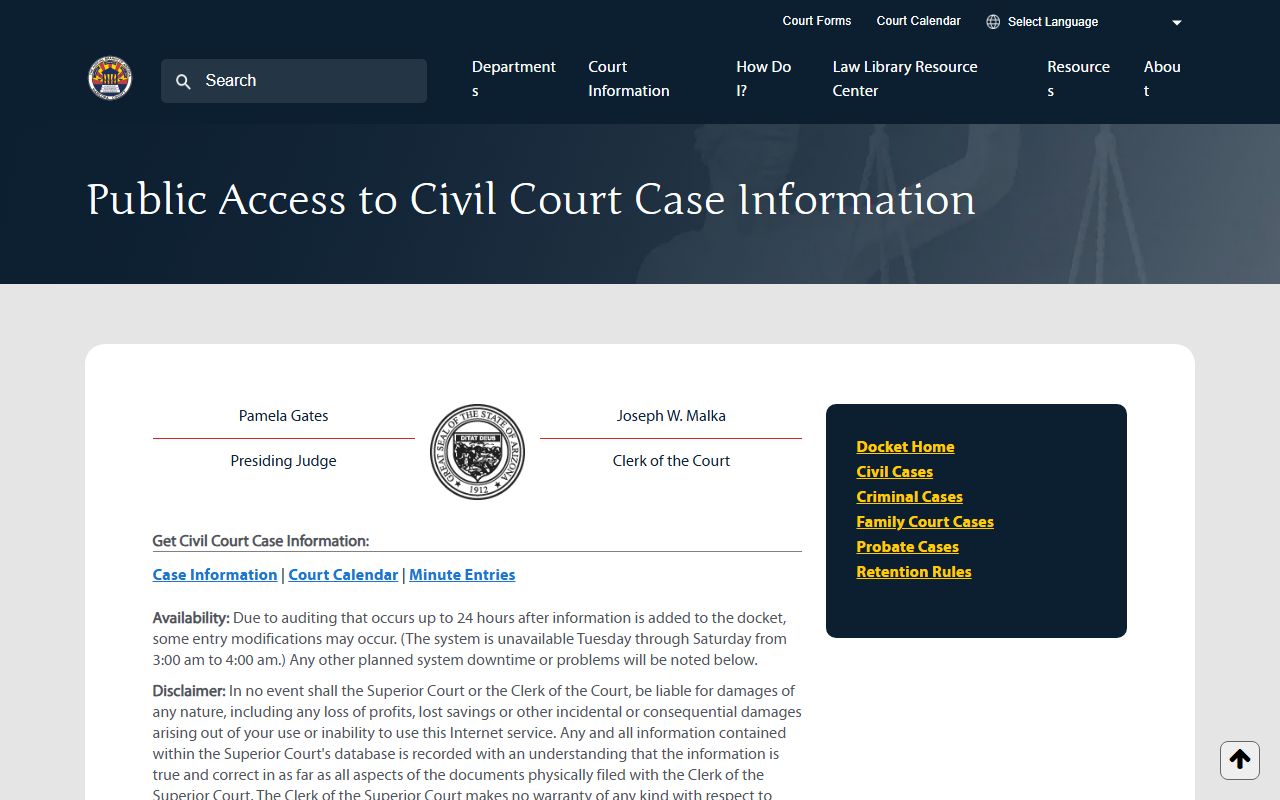
The index page also links to the Court Calendar and the Minute Entries portal, so you can move from a case to its hearings or to a typed record of a ruling.
- Pick the court level. Superior Court handles felonies, family law, probate, and high-dollar civil. Justice Courts handle small claims, evictions, traffic, and most misdemeanors. City courts handle local code and city traffic.
- Open the right Superior Court docket: Civil, Criminal, Family, or Probate. For a limited case, open the Justice Court case search instead.
- Choose a search path. Name search uses Last Name and First Name. Criminal also accepts initials plus DOB. Case number search jumps straight to a case page.
- Type the case number exactly as it is printed. The civil form caps case-number length and the criminal form caps at 13 characters.
- Click Search and read the results table. The columns show Case Number and Party or Business Name. Protected parties may show "Information is protected and will not be displayed."
- Click a case number to view the case-history page. Note the judge, file date, location, and party roles, then scroll down to the docket of filings.
- Need a copy of a filed document? The public docket lists titles only. Use the Clerk's record request, eAccess, or ECR Online to get the file itself.
Maricopa County Court Records Search Fields
Each Superior Court docket portal shares a near-identical form, with small tweaks per case type. The criminal portal adds an initials-with-DOB path for people who do not know the full name. The Justice Court portal uses a tabbed layout for Name, Business Name, and Case Number. The civil case search form for party and case-number lookups is shown below.
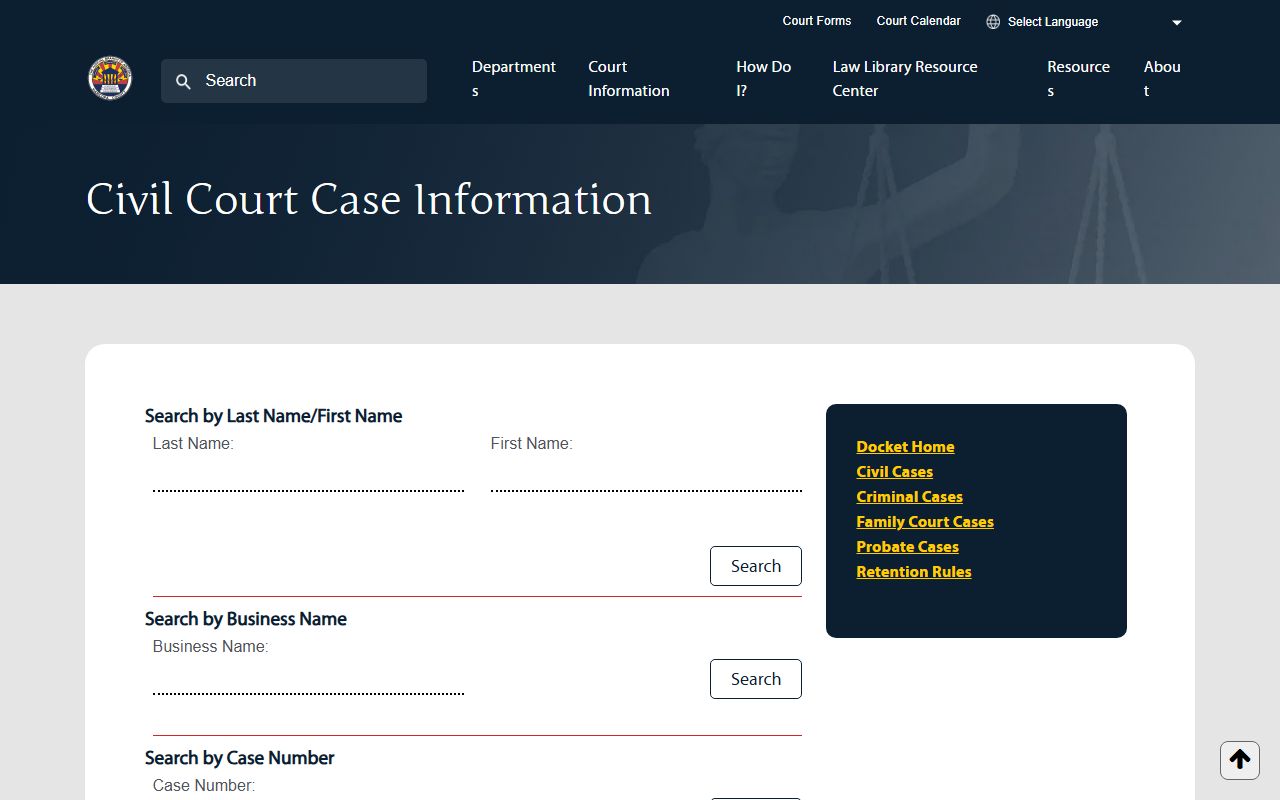
Use the field map below when you set up a search. It lists what each input does, whether it must be filled in, and any format notes.
| Field Label | Type | Required | Notes / Format |
|---|---|---|---|
| Last Name | Text | Optional | Pair with First Name for a party search. Used on all four Superior Court dockets. |
| First Name | Text | Optional | Form size 20 on Family and Probate. Used with Last Name. |
| Business Name | Text | Optional | Civil docket only. Run a search by company instead of a person. |
| Last Name Initial | Text (1 char) | Optional | Criminal docket only. Pairs with First Name Initial and DOB. |
| First Name Initial | Text (1 char) | Optional | Criminal docket only. Used in the initials and DOB path. |
| DOB | Date | Optional | Criminal docket only. HTML date input; format mm/dd/yyyy. |
| Case Number | Text | Optional | Civil and Family limits vary. Criminal caps at 13 characters. Use the exact prefix (CV, CR, FC, FN, PB). |
| Justice Court Name tab | Tab | n/a | Default search; Last Name is marked required for the Name tab. |
| Justice Court Business tab | Tab | n/a | URL parameter q=bn; a Business Name field is required. |
| Justice Court Case Number tab | Tab | n/a | URL parameter q=cn; a Case Number field is required. |
The Justice Court warns that the site "is not the official court record" and that records are kept under the Arizona Supreme Court Records Retention Schedule for Limited Jurisdiction Courts. The Justice Court case search portal for the 26 precincts is pictured next.
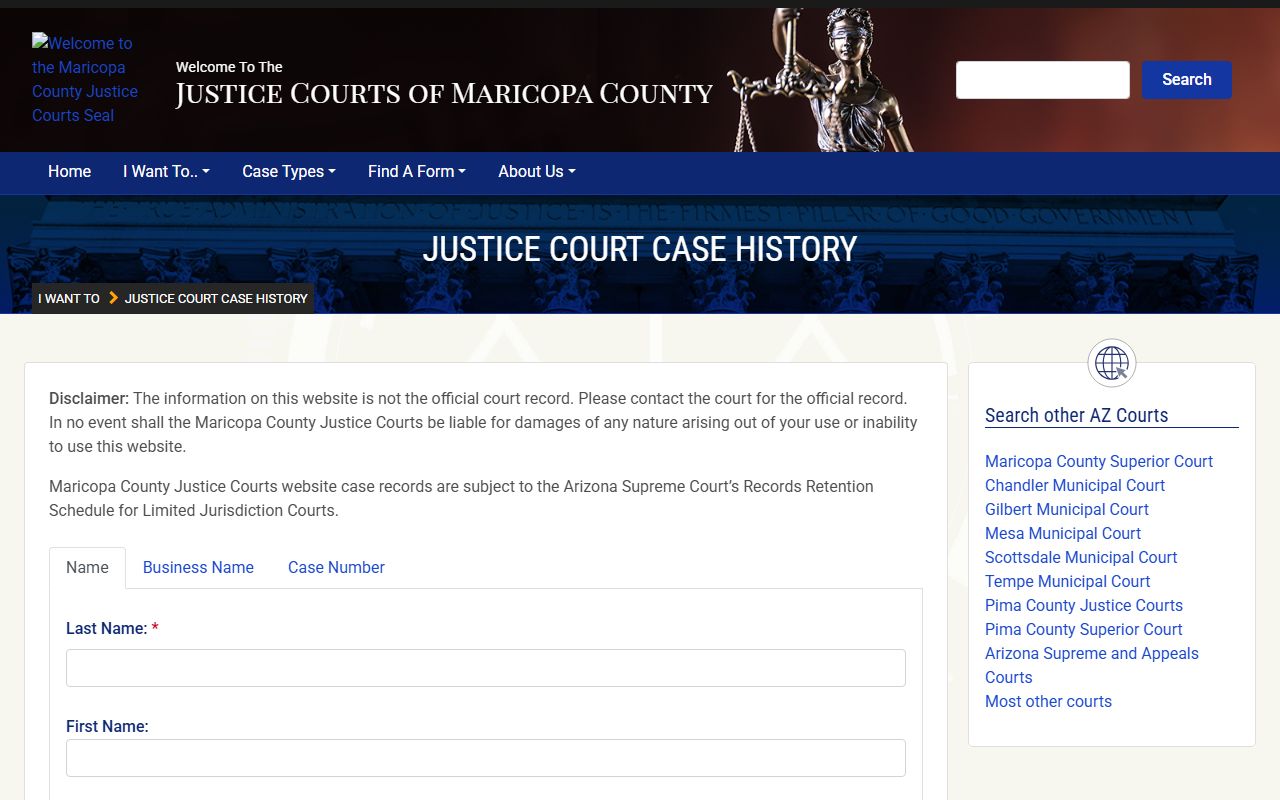
For any official-record need, send a request to the specific precinct that heard the case. Clerks at one Justice Court cannot pull files from another.
Types of Maricopa County Court Records
Court records here cover a wide range of case types. The Superior Court is a general-jurisdiction trial court, so its files run from felony cases to wills and trusts. The 26 Justice Courts and the city municipal courts cover the smaller daily matters. Each case type creates its own kind of file.
The list below pulls from the court's own case-category pages. It groups the main record types and notes which court tends to hold them.
- Civil case records. Contracts, personal injury, property damage, and medical malpractice files. Superior Court holds civil cases above the $10,000 Justice Court limit, and runs a Commercial Court plus arbitration for disputes under $50,000.
- Criminal case records. Felony cases from the first court date through sentence and any post-conviction filings. Docket entries cover indictments, release orders, bond, pleas, and sentence terms.
- Family law records. Divorce, legal decision-making, parenting time, child support, paternity, and protection orders. Files often include petitions, decrees, parenting plans, and support worksheets.
- Probate records. Wills, estates, guardianship, conservatorship, trusts, and mental-health matters. Files include letters of personal representative, inventories, accountings, and appointment orders.
- Traffic and misdemeanor records. Civil traffic, criminal traffic, shoplifting, theft, simple assault, and similar lower charges, plus marijuana expungement filings. Justice Court and city courts share this load.
- Small claims and evictions. Small claims at $3,500 or below, and eviction actions at $10,000 or below. Justice Court holds these files, with a writ of restitution at the end of an eviction.
- Juvenile records. Delinquency, dependency, adoption, guardianship, and emancipation. Many files are not open to the public under state law.
- Appeals and judgments. Superior Court hears appeals from Justice and city courts. The Court of Appeals hears most appeals from Superior Court rulings.
What Maricopa County Court Records Show
Open a Superior Court civil case and the public view loads a structured case-history page. The top of the page lists the case header. Below the header, two big tables hold party data and the docket of every filing. A sample civil case-history page for CV1991-028550 shows the layout.
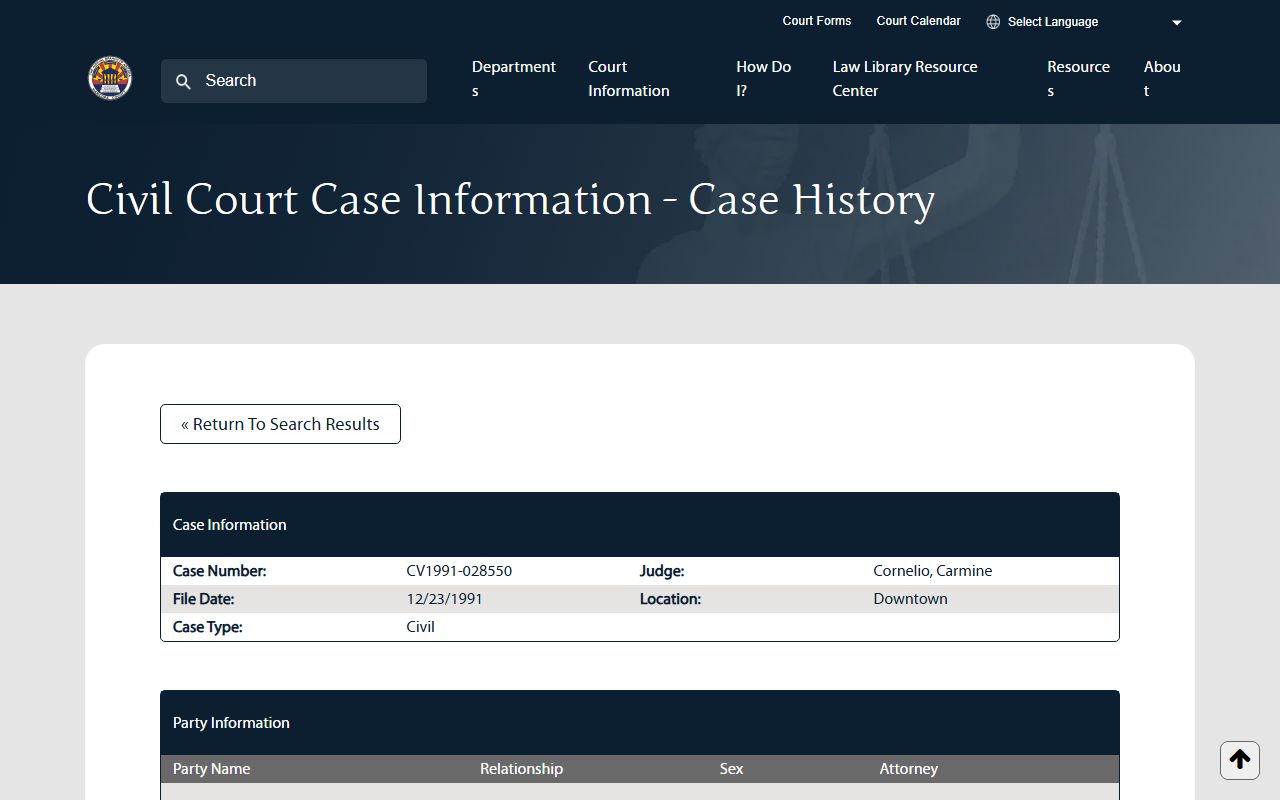
The table below maps each field on a public case record to what it shows you. Use it as a quick legend when you read a docket for the first time.
| Field | What It Shows |
|---|---|
| Case Number | The court's unique ID. Prefix codes signal the type (CV civil, CR criminal, FC or FN family, PB probate). |
| Judge | The judicial officer assigned to the case. Civil FAQ says the judge or commissioner code shows in the right corner under "JO." |
| File Date | The date the case was opened with the court, in MM/DD/YYYY form. |
| Location | The court site or department. Many files show "Downtown" for the Phoenix court complex. |
| Case Type | The broad case class (Civil, Criminal, Family, Probate). |
| Party Name | The full name for each side. Protected parties may show "Information is protected and will not be displayed." |
| Relationship | Role of each party: Plaintiff, Defendant, Petitioner, or Respondent. |
| Sex | Listed on civil party rows when known. |
| Attorney | Lawyer of record, or "Pro Per" when a party stands for themselves. |
| Filing Date | The date a document was filed with the court. |
| Docket Date | The date the entry was added to the docket. Often the same as the filing date. |
| Description | Short title of the filing. Common codes include ORD (Order), AFF (Affidavit), NOH (Notice of Hearing), and MEJ (Motion for Default Judgment). |
| Filing Party | Which side filed the paper. |
| Minute Entry | A court-made record of a hearing, ruling, or step in the case, marked ME on the docket. |
Note: The public docket lists document titles only; to read or print a full filing, place a copy order with the Clerk or use eAccess or ECR Online.
Public Access Framework for Maricopa County Court Records
Two layers of law set the access rules. The first is Arizona's general open-records law in Title 39. Under A.R.S. § 39-121, public records in the custody of an officer are open for inspection by any person during office hours. The companion section A.R.S. § 39-121.01 sets the duty to keep records, lets you ask for copies or photos, and asks each person to mark a request as commercial or non-commercial.
The second layer is Arizona Supreme Court Rule 123. Rule 123 sets the access rules for all court records in the state. The Clerk's records page says case records are open except as closed by law or by Rule 123, and the Justice Court records page cites the same rule. Rule 123 also covers bulk data, commercial use, and fees, and it spells out which kinds of files are closed by default.
If a request is denied without a good reason, the path to fight back is set by A.R.S. § 39-121.02. A person may file a special action in Superior Court, and the court can order release, award costs, fees, and in some cases damages. Court-record denials use Rule 123 and the court's own process; a sealed file may require a motion or a court order before any part of it can be read.
Commercial users have extra rules. A.R.S. § 39-121.03 calls for a written statement of purpose for any record used for a commercial reason. This catches data brokers, private investigators, and background-check firms. Misuse of records pulled for a commercial purpose can lead to civil action by the state.
Note: Court records are not pulled with a generic county public-records request; each request must go to the court that holds the file, through the Clerk or the Justice Court.
Sealed and Confidential Maricopa County Court Records
Some files are closed by default, and some are sealed after a court order. Juvenile dependency, severance, and adoption files are not open to the public under A.R.S. § 8-208(F). Some delinquency files are open under the same statute, but victim names must be protected and the court can close the file if there is a clear public interest in keeping it private. Adoption files are sealed for 100 years under state library guidance and statute. Mental-health treatment records are confidential under A.R.S. § 36-509.
Adults can ask the court to seal an old case under A.R.S. § 13-911. The petition is filed in the court that heard the case, or in the court of first appearance if no charge was filed, or in Superior Court in the county of arrest if no court date ever happened. The court cannot grant or deny the petition for 60 days unless the prosecutor and any victim do not object. Waiting periods run from the end of all non-money terms: 10 years for class 2 and 3 felonies, 5 years for class 4, 5, and 6 felonies, 3 years for class 1 misdemeanors, and 2 years for class 2 and 3 misdemeanors. Money obligations and restitution must be paid first. Dangerous offenses, dangerous crimes against children, serious or violent felonies, and certain sex offenses are not eligible.
Set-aside under A.R.S. § 13-905 is a different tool. It lifts many penalties of a guilty judgment but does not hide the case from public view. Marijuana expungement under A.R.S. § 36-2862 is narrower but stronger: for pre-legalization possession, transport, plant, or paraphernalia charges within the legal limits, the court can vacate the conviction, expunge the records, and seal the file so that only the person or their lawyer can see it.
To view a sealed file, file a written motion in the court that holds the case. Some sealed files can still be read by courts, prosecutors, law enforcement, probation, corrections, the Arizona Department of Public Safety, the person whose record was sealed, and named victims with notice rights. For more on this side of the file, see criminal records and the FAQ page.
In-Person Court Record Requests
For a stamped paper copy, a certified copy, or any file that the online docket does not display, walk in or mail a request to the Clerk of the Superior Court. The Clerk Customer Service Center on West Jackson holds the records desk, marriage license window, and many service counters. The Clerk also takes online record requests for non-case-related and complex files.
The Clerk's Superior Court miscellaneous fee schedule lists copy, certification, exemplification, authentication, marriage license, and research fees. Bring cash, card, or check, and bring photo ID for any pickup that needs a signature.
Clerk of the Superior Court
Clerk: Joseph W. Malka
Customer Service Center
601 W Jackson Street
Phoenix, AZ 85003
602-372-5375 (602-37-CLERK)
Monday to Friday, 8:00 AM to 5:00 PM
Justice Court files do not come through the Clerk of the Superior Court. Send a copy request to the precinct that heard the case. Court clerks do not run background checks, and any request that does not name a case number may be turned down.